
What Are the Eligibility Criteria to Apply for the Green Tick on WhatsApp?
WhatsApp doesn’t make it easy for just any business to get verified. Here’s what you need:
- A legally registered business
- Official business documentation
- A professional website or strong social media presence
- A genuine business phone number
- A real physical or digital business address
- Compliance with WhatsApp’s business policies
- Consistent and authentic online presence
- Clear business information
- Proof of business operations
How to Get Verified: A Step-by-Step Guide
Getting your green tick isn’t as hard as you might think. Follow these steps:
- Create a WhatsApp Business Account: Start by setting up an official WhatsApp Business account. Make sure every detail is accurate and complete.
- Prepare Your Documents: Gather all necessary business documents:
- Business registration certificates
- Tax identification documents
- Proof of business address
- Official identification of business owners
- High-quality, clear copies of all documents
- Complete Your Business Profile: Fill out every section of your WhatsApp Business profile:
- Business name
- Description
- Contact information
- Business hours
- Website
- Business category
- Submit Verification Request: Use the WhatsApp Business API to submit your verification request. Double-check everything before sending.
- Wait for Review: WhatsApp will review your application. This can take anywhere from a few weeks to a couple of months.
Combating WhatsApp Green Tick Verification Rejections
Getting rejected can be frustrating, but don’t give up! Here are some pro tips:
- Carefully review all submitted information
- Ensure all documents are crystal clear and up-to-date
- Maintain a consistent online presence
- Address any specific concerns WhatsApp raises
- Be patient and persistent
- Seek help from WhatsApp Business support if needed
Is it Mandatory to have a Green Tick to Use WhatsApp API?
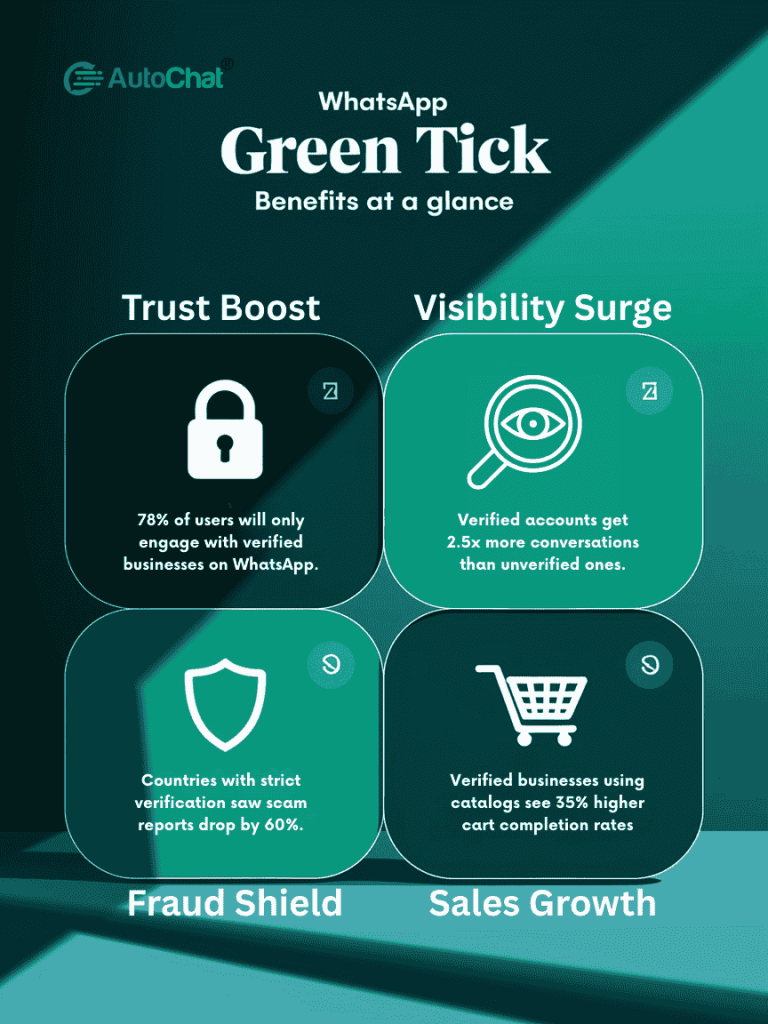
No, it’s not mandatory. However, having a green tick is like having a VIP pass. While you can use the WhatsApp Business API without verification, the green tick:
- Increases customer trust
- Provides additional features
- Improves account visibility
- Better and clear communication
Difference Between Green Tick and Grey Tick
| Green Tick | Grey Tick |
|---|---|
| Full verification | Partial verification |
| Complete business authentication | Less comprehensive checks |
| Maximum credibility | Limited business features |
| Full access to business features | Basic account authentication |
How Long Does it Take to Get Verified?
The verification timeline typically looks like this:
- Initial application review: 1-2 weeks
- Complete verification process: 3-4 weeks
- Complex cases: Up to 6-8 weeks
Patience is key. WhatsApp wants to ensure they’re verifying genuine, trustworthy businesses.
The WhatsApp Green Tick is more than just a small symbol. It’s a powerful tool that helps businesses build trust, improve credibility, and connect with customers in meaningful ways.
AutoChat: Turn Chats into Sales
Want to make your business better?
AutoChat is like a super-smart helper for your WhatsApp. It talks to customers for you, day and night. No more missed messages or slow replies!
This cool tool answers questions quickly, helps you sell more, and saves you time. Imagine having a helper that can talk to many customers at once, day and night, without getting tired. It’s like having a team of workers but without the extra cost.
AutoChat makes your business look professional and helps customers get answers fast. Whether you’re a small shop or a big company, this tool can help you grow. Stop wasting time on simple questions and start focusing on making your business awesome!