
What Is WhatsApp Chatbot?
WhatsApp Chatbot is like having a digital helper right in your messaging app. Businesses set them up to chat with customers when staff aren’t around. These bots can answer questions, take orders, update you on deliveries, and fix simple problems—all through regular text messages. They never sleep and can talk to hundreds of people at once.

Some just follow basic scripts, but newer ones actually understand what you’re asking. It’s way cheaper and more efficient for businesses than hiring a customer service team. The next time you message a business on WhatsApp and get a quick reply at midnight, you’re probably talking to one of these chatbots.
Understanding the Working of a Chatbot
Chatbots are computer programs designed to simulate conversation with people through text or voice.
These digital helpers work behind the scenes when you message a business. They’re like customer service reps who never sleep or take breaks. Most companies use them to cut down on hiring costs and handle the flood of basic questions they get daily.
At their core, chatbots work by receiving messages, processing them, and sending back appropriate responses.
It’s a back-and-forth exchange. You type something, the bot reads it, thinks about it (in its way), and writes back. The whole process usually takes just seconds. The tricky part is getting the bot to understand what you want.
The simplest chatbots use a method called “pattern matching” – they look for specific keywords in your message and respond with pre-written answers. These are the frustrating ones we’ve all dealt with. They’re basically just fancy search engines. You say, “Return my shoes”, and the bot sees “return” and gives you the return policy. Miss the keyword, and you’ll get the dreaded “I don’t understand” message.
Since most folks check WhatsApp constantly, you get much better response rates than email or phone calls. Your local bakery can blast out a message about fresh bread and get orders instantly. Customers love it because they don’t need to download yet another app or remember another password.
Advanced WhatsApp bots can handle complex business processes seamlessly. You can connect your bot directly to your inventory system, so it knows exactly what’s in stock before making promises to customers. Your e-commerce store can show product photos, process credit cards, and issue refunds—all without you lifting a finger.
The real game-changer is how WhatsApp bots handle multiple languages. If you run a business in a multilingual area, your bot can detect which language a customer is using and switch on the fly.
A restaurant in Miami set their bot to handle both English and Spanish conversations, expanding their delivery business to twice as many neighborhoods almost overnight.
Why Use WhatsApp Chatbot in Automation? (Benefits)
1. Reaches customers where they already are
Your customers are already glued to WhatsApp all day. They check it first thing in the morning and last thing at night. Why force them to download your app or visit your website when you can talk to them on a platform they never close?
2. Slashes your response times
Nobody likes waiting on hold with customer service. With a WhatsApp bot, customers get instant answers at 3 AM on Christmas Day.
A plumbing company cut their emergency response time from 2 hours to 2 minutes using a basic WhatsApp bot.
3. Handles the monotonous things automatically
Your staff is wasting hours answering “What time do you close?” fifty times a day. A WhatsApp bot handles these repetitive questions, freeing up your team to deal with the complex issues that actually need a human touch.
4. Costs way less than hiring people
A decent customer service rep costs you at least $35,000 a year, plus benefits. A WhatsApp bot costs a fraction of that and never calls in sick or quits without notice.
5. Collects customer data without being creepy
Every interaction teaches you something about your customers without forcing them to fill out annoying surveys. Your bot can track which products they’re asking about, what problems keep coming up, and even what time of day most people contact you.
6. Sells products while you sleep
Your physical store closes, but your WhatsApp bot never does. Customers can browse products, place orders, and pay—all at midnight in their pajamas.
An online bakery doubled its revenue by letting people pre-order breakfast pastries via WhatsApp the night before.
Simple Steps to Creating a WhatsApp Chatbot
Get your WhatsApp chatbot running without hassle. Here’s what you need:
How to Get Started?
- Comply with WhatsApp API limitations – WhatsApp has rules. Break them, and you’re blocked.
- Get the WhatsApp Business App – Download it. Set up your profile. Learn the basics.
- Obtain WhatsApp API access – Apply through Meta. They check if your business is real or not, which takes time.
- Choose a builder platform – Platforms like AutoChat provide adept and robust chatbots with WhatsApp automation for easy sales.
Making Your Bot
- Create the chatbot flow – Map out your conversations with a list of questions people might ask.
- Set up triggers – Words that make your bot answer. Someone types “price,” and the bot shows prices.
- Add content – Put in answers, pictures, files. Keep it short.
- Test and launch – Try it with friends before customers see it.
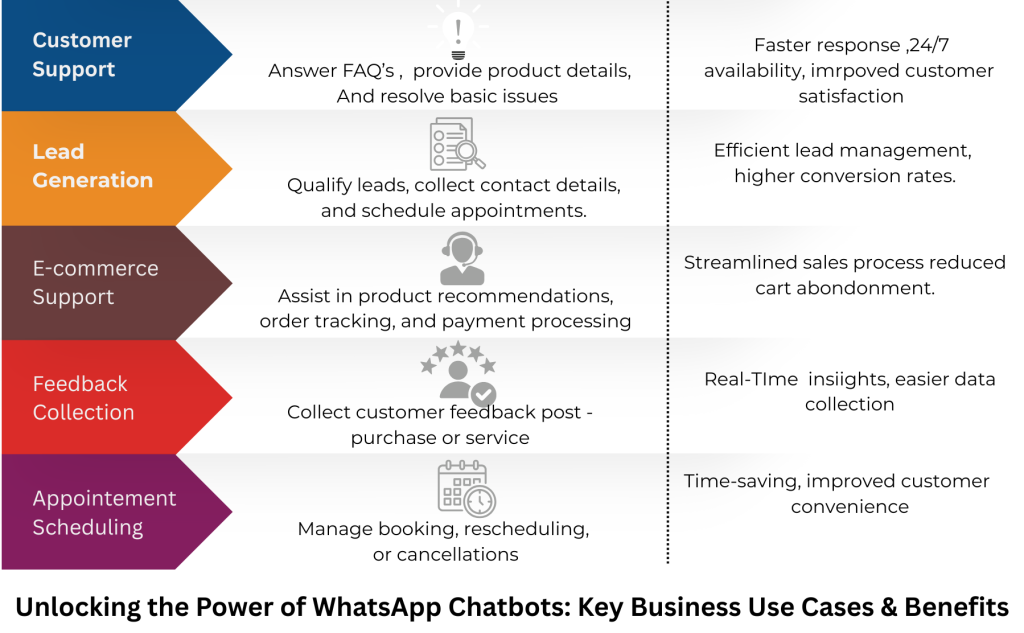
WhatsApp Chatbot Use Cases
- Answering common questions
- Appointments and reminders
- Tracking packages
- Getting customer info
- Showing products
- Selling things
- Event sign-ups
- Asking for feedback
AutoChat – Your Comprehensive WhatsApp Marketing Solution + ChatBot Builder
You’re going to love what AutoChat can do for your WhatsApp marketing. We created this tool because we know how frustrating most chatbot builders are.
You’ll find it super easy to use. Just drag a few blocks around to create your conversation flows. Want to show product photos? You can do that. Need to collect payments? You can do that, too. Want to send reminder messages? Simple.
The secret weapon? Our built-in OpenAI integration lets your bot handle any customer question with detailed, natural-sounding responses. Customers can’t tell they’re talking to a bot, which means higher satisfaction and fewer support tickets landing on your desk. You’ll get the best data showing exactly what your customers are asking about most, so you can keep improving your bot.
Whether you run a small shop or a big company, AutoChat works for you. You only pay for what you use, so it’s affordable for everyone.